Blur
Keep your real room but softly out of focus, like a camera with a fast lens.
Blur your room or replace it with a calm scene while you record your screen and camera. Background removal runs on your device, so your video never leaves your computer.

Keep your real room but softly out of focus, like a camera with a fast lens.
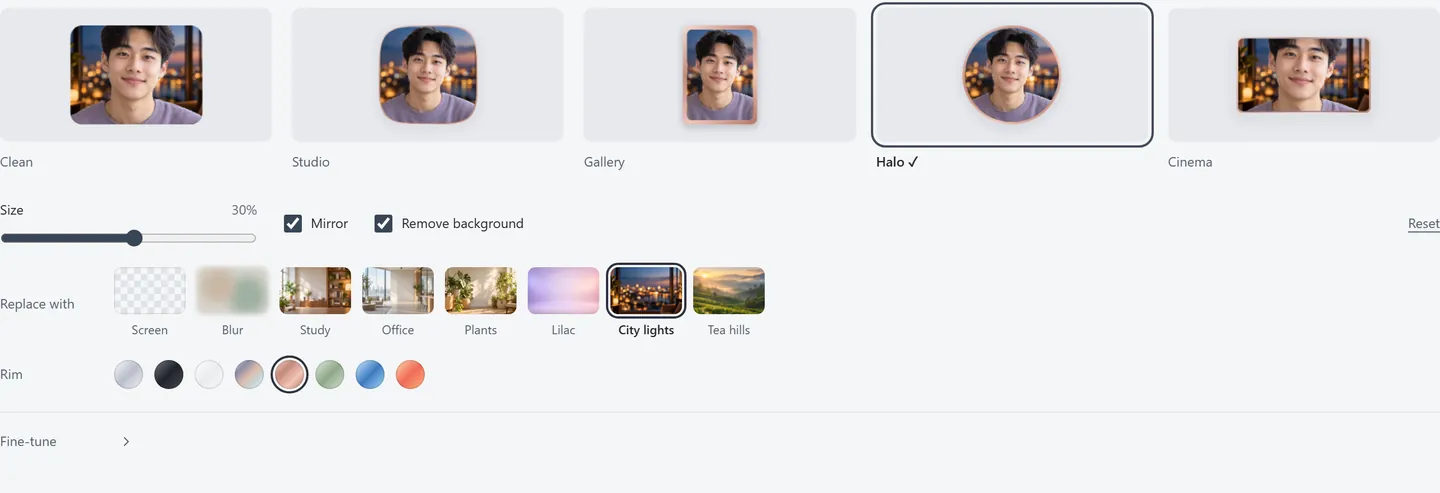
Study, Office, Plants, Lilac, City lights and Tea hills. They are gently blurred on purpose, so the edges around you look natural.
Remove the background completely and your camera floats as a cut-out over your shared screen.
Pick a background, then a camera style and a rim. Five looks (Clean, Studio, Gallery, Halo and Cinema) and eight rim colours give you anything from a clean square to a round, cinematic frame. Put your screen in a frame with a backdrop and the whole video looks produced, with no editing.
No. It runs in your browser on your own computer. Your camera picture is never sent anywhere, and neither is your recording.
No. Recvela finds you in the picture automatically, so a normal room works. Good light in front of you helps.
It runs in the background at up to 15 frames per second. Most recent laptops handle it well. On an older one, try Blur or switch it off if recording feels slow.
Yes. Backgrounds, camera styles, rim colours and screen frames are all free, with no account.
Your recording and script never leave your device.
Start recording free